
Get started in minutes.
QiikTV works with TiviMate, Xtream Player and IPTV Smarters Pro. Your username and password are case sensitive and can be found in your initial email.
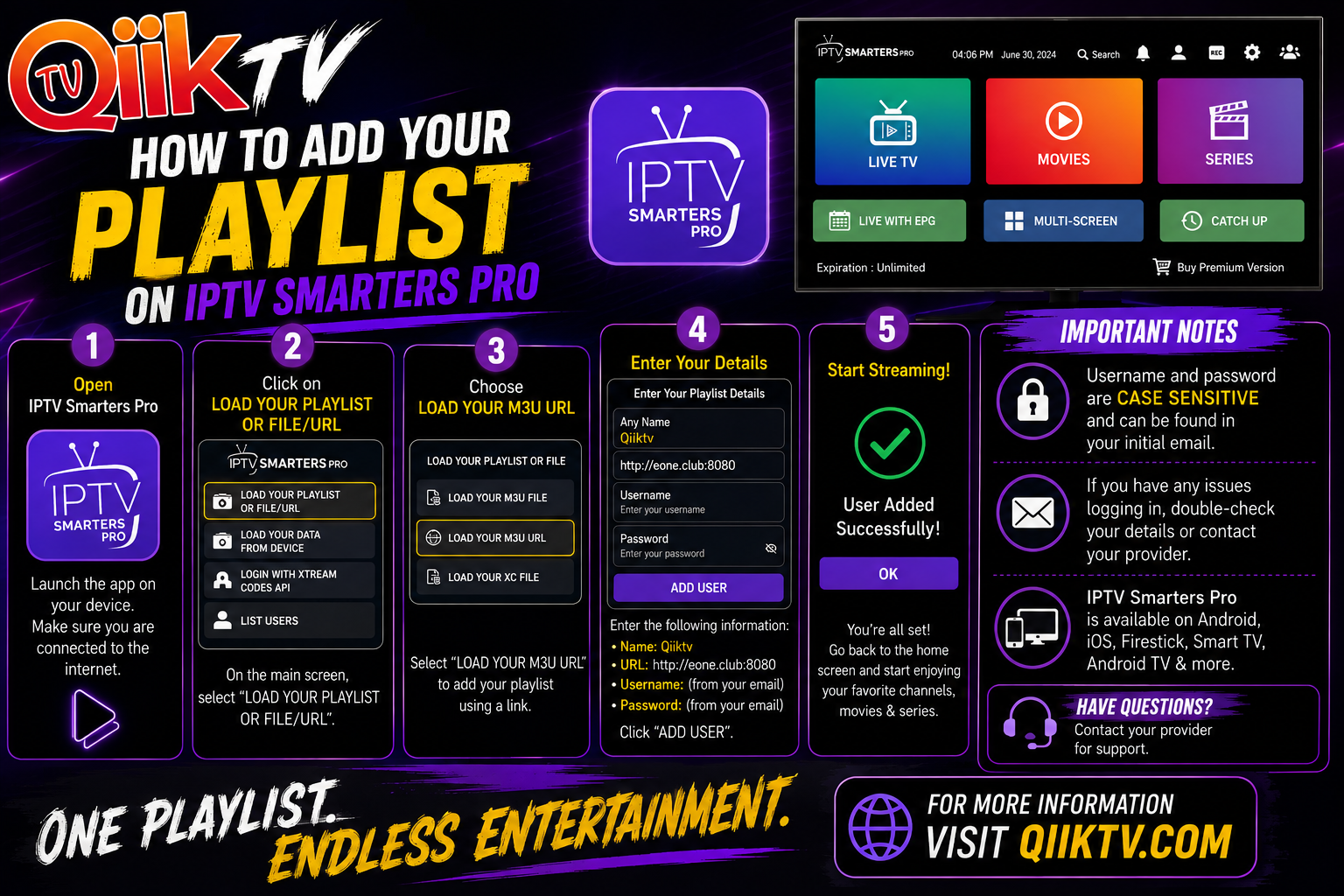
Use the visual setup guide.
Keep this page open on your phone or tablet while setting up your television or streaming device.
Playlist details
Playlist Name: QiikTV
URL: http://eone.club:8080
Username: from your initial email
Password: from your initial email
When your preferred player isn’t in the app store.
Enable Developer Options
Go to Settings → My Fire TV → About. Highlight your Fire TV device name and press Select/OK on the remote 7 times. Then open Developer Options → Install unknown apps and enable Downloader.
Downloader Options
QiikTV app code:
Direct APK: https://Qiiktv.com/App/QiikTV.apk
TiviMate Downloader code:
Compatible apps and devices.
Players
TV & Streaming
Handheld
Choose your player
Compatible apps include TiviMate, Xtream Player and IPTV Smarters Pro.
Fire TV / Downloader
If your preferred player is not available directly, install Downloader and follow the device prompts for developer options and permission to install from unknown sources.
QiikTV Downloader code: 723707
TiviMate Downloader code: 272483